Open source · local bridge · explicit confirmation

MCP for Adobe Premiere Pro: make Premiere changes you can inspect before you apply.

Connect the MCP-compatible client you already use to a local Premiere bridge. Review the target and plan first, then confirm supported work with current project state.

Project context is opt-in and local. Applied plans require current targets and confirmation.

Illustrated product workflow

Keep the context. Review the change.

A local project-context workflow makes the request inspectable from first evidence to returned result. This maps real MCP tools; it is not a recording of a live Premiere session.

manage_project_context

Capture context

Read-only · opt-in local index

Create a bounded local snapshot of the active sequence and source identities.

  • No context is captured until an MCP client explicitly calls the tool.
  • Native project and media paths are hashed before persistence.
  • Capture establishes revisions for later stale-state checks.
v1.14.8

Current release

macOS + Windows

Supported desktop hosts

Local-first

Media stays on your machine

MIT licensed

Source available on GitHub

Illustrated product walkthrough

From prompt to an explicit result.

See the intended request-to-result flow. This animation is not a recording of a live Premiere host session.

LOCAL BRIDGE · 332 TOOLS

Timeline

B-roll inserted on V2

Finish

Grade and title applied

Delivery

ProRes export queued

A narrower interface for predictable edit work.

Give an MCP-compatible client structured operations instead of asking it to infer state from Premiere's interface.

Edit timelines with intent

Insert, overwrite, trim, split, move, ripple-delete, roll, slide, and slip across sequences and tracks.

Apply repeatable finishing work

Apply effects, adjust Lumetri parameters, load LUTs, stabilize clips, and automate repetitive grading steps.

Control keyframes and motion

Add, update, and inspect keyframes with interpolation controls for repeatable animation work.

Organize project structure

Import footage, manage bins, create sequences from presets, inspect metadata, and work with proxies.

Prepare exports with explicit settings

Queue sequences and project items through Adobe Media Encoder using the presets you choose.

Use documented extension seams

Use the structured MCP surface or run custom ExtendScript and QE DOM workflows when you need deeper control.

Connect the assistant you already use.

Pick your client. The first step only checks that it can reach Premiere; it makes no edits.

Claude Desktop

Open the downloaded bundle in Claude Desktop. It includes the local server, so this path does not ask you to install Node just to connect Claude.

Download Claude Desktop bundle

Set up in four steps.

  1. 01

    Install the Premiere connector

    This separate CEP connector is what lets your assistant talk to Premiere. Open the download with a trusted ZXP installer; if your computer has none, use the npm installer under Advanced setup.

    Download connector package
  2. 02

    Connect Claude Desktop

    Finish the route above, then fully close and reopen both your assistant and Premiere.

  3. 03

    Run a safe check

    Open a project and use the read-only prompt below. It runs the connection check and makes no changes.

  4. 04

    Ready to edit

    Once the connection check passes, try a preview before applying any edits.

Safe first prompt

Safely check my Premiere connection with verify_premiere_connection. Make no changes.

Advanced setup for npm, manual configuration, and other MCP clients

Install from npm

Use this route if your assistant does not support a native bundle. It requires Node.js 20.19+.

npm install -g premiere-pro-mcp
premiere-pro-mcp --install-cep

Manual server configuration

Only use this when your client asks for a command. Keep Premiere, the connector, and the client on the same computer.

{
  "mcpServers": {
    "premiere-pro": {
      "command": "premiere-pro-mcp"
    }
  }
}
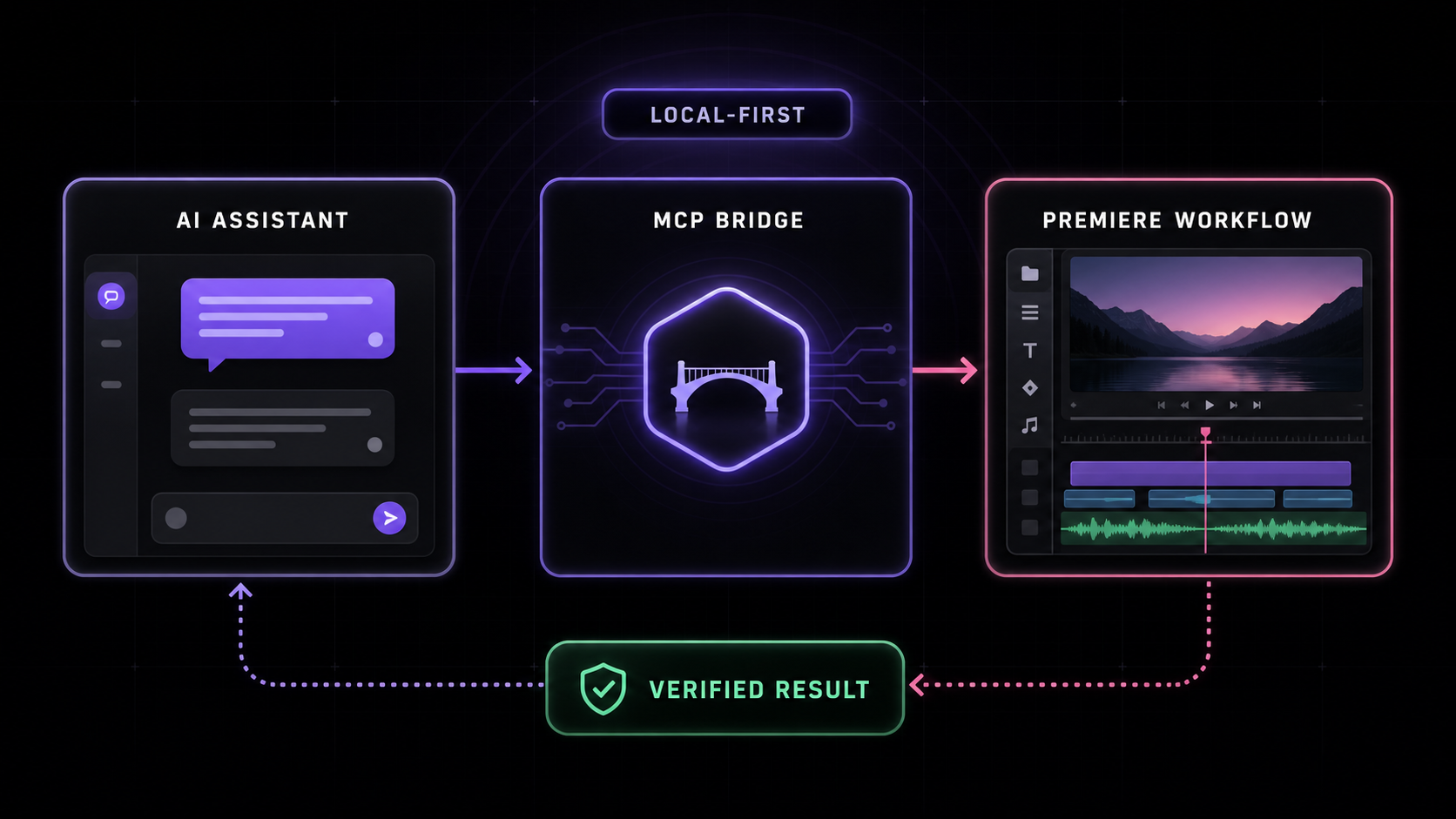
Local-first workflow: an AI assistant sends a request through the MCP bridge to Premiere, which returns a verified result.
The recommended path keeps the assistant, MCP bridge, Premiere, and project media on the same computer. A verified result still depends on a live host connection.

How the bridge works

A local-first file bridge keeps the control path inspectable and avoids exposing your project media to the MCP server.

Your AI calls a tool

Claude, Cursor, Windsurf, or another MCP client sends a structured request to the local server.

The bridge runs it in Premiere

A versioned helper library and small ES3 script pass through a private shared temp directory.

Premiere returns a result

The CEP bridge executes the command and sends structured data, confirmation, or diagnostics back to the client.

Compatibility & diagnostics

The signed CEP connector is the default route for Premiere Pro 2020–2026 on macOS and Windows. A modern UXP bridge adds capability-gated workflows on compatible newer hosts.

Automatic bridge startup

The CEP bridge creates its temp directory and starts polling when Premiere activates.

Modal-stall diagnostics

In-flight heartbeats help distinguish an open Premiere dialog from a disconnected bridge.

Know the boundary: UXP is capability-gated for compatible newer Premiere workflows; it is not yet the default installer or a replacement for CEP. Premiere’s undocumented QE DOM is powerful but imperfect, so results should be verified before you rely on them.

Need the full tool list, schemas, or troubleshooting guide?

The README documents every setup path and known security boundary.

Read the documentation

MCP for Adobe Premiere Pro FAQ

Straight answers about compatibility, privacy, AI clients, and remote access.

Read the complete documentation
What is MCP for Adobe Premiere Pro?

MCP for Adobe Premiere Pro is an open-source Model Context Protocol server that gives compatible AI clients a structured set of tools for editing timelines, applying effects, managing media, and exporting from Adobe Premiere Pro.

Which Premiere Pro versions and operating systems are supported?

The signed CEP connector is the default route for Adobe Premiere Pro 2020–2026 on macOS and Windows, including Apple Silicon and Intel Macs. The UXP bridge adds capability-gated workflows on compatible Premiere 25.6+ hosts; it is not the default installer.

Does MCP for Adobe Premiere Pro upload my footage?

The recommended setup is local-first. Premiere Pro, the connector, and the MCP server run on your machine, and the bridge exchanges commands and structured results rather than automatically uploading project media. Your AI assistant’s separate privacy settings still apply.

Which AI clients can connect to it?

Claude Desktop has a released self-contained bundle and is the recommended starting point. Cursor, VS Code / Copilot, Windsurf, and other MCP-compatible clients can use the local server route. A native one-click installer for every client is not currently shipped.

Can I use the MCP server remotely?

A remote HTTP transport is available, but it requires authentication and a working connection back to the local Premiere Pro bridge. For most editors, the local setup is simpler and safer.

Free · open source · local-first

Start with a connection you can verify.

Connect your assistant, verify the local bridge without making changes, then preview the first edit before you apply it.

Choose your assistant
Your media stays localMIT licensed on GitHubPremiere Pro 2020–2026 · macOS and Windows