How Premiere Pro MCP Works
Premiere Pro MCP uses a local-first, file-based architecture to connect AI assistants to Adobe Premiere Pro. This page explains the technical workflow, security model, and communication protocol.
Architecture overview
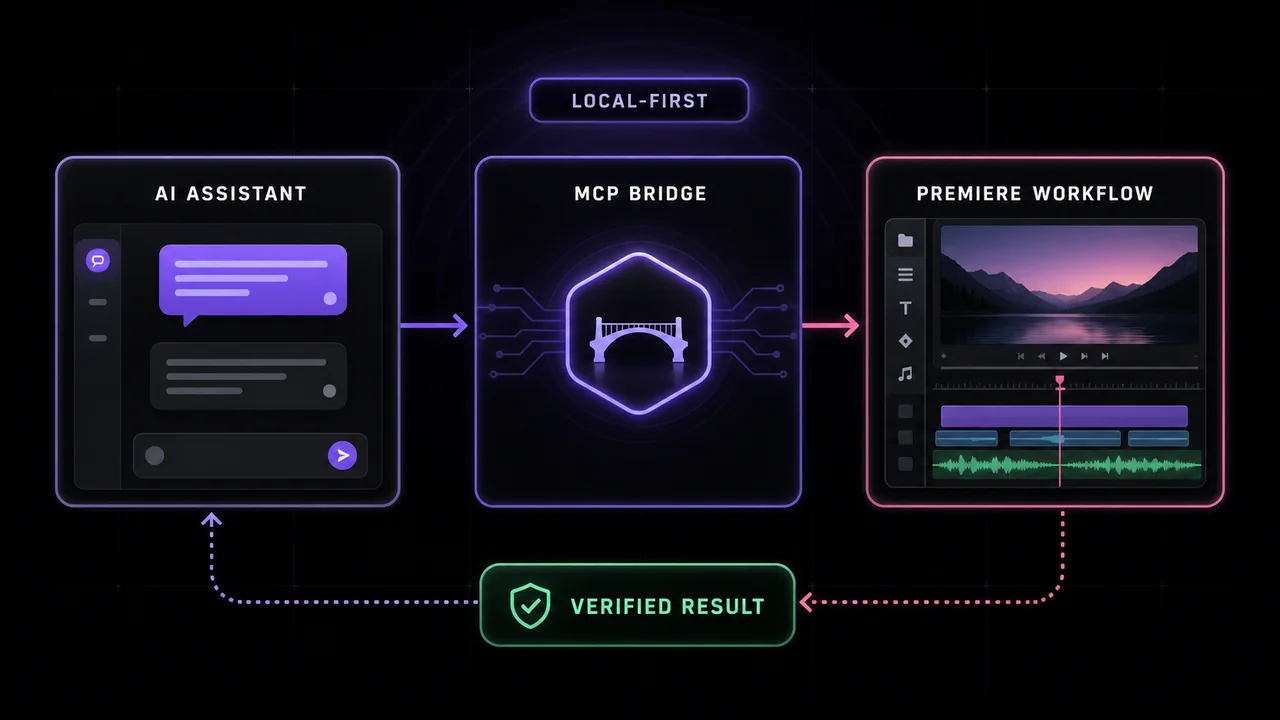
Premiere Pro MCP consists of three components that work together:
Your AI Assistant
Claude Desktop, Cursor, VS Code, or any MCP-compatible client. The AI analyzes your natural language prompts and decides which MCP tools to call.
The MCP Server
A Node.js process (premiere-pro-mcp) running on your machine that exposes 447 structured tools via the Model Context Protocol. It translates tool calls into Premiere-compatible scripts and manages file-based communication.
The Premiere Connector
A CEP plugin running inside Adobe Premiere Pro that polls for command files in a private temp directory, executes them via Premiere's ExtendScript API, and writes structured JSON results back.
Step-by-step workflow
Here's what happens when you ask your AI assistant to edit something in Premiere Pro:
You send a prompt to your AI assistant
In Claude, Cursor, or another MCP-compatible client, you describe what you want to edit in natural language: 'Split all clips at 5 seconds' or 'Add a cross dissolve between clips.'
AI calls the appropriate MCP tool
Your AI assistant analyzes your request and calls one or more tools provided by Premiere Pro MCP with structured parameters (e.g., split_clip with a specific time code).
MCP server generates a command script
The MCP server translates the tool call into an ES3 ExtendScript command file that's safe for Premiere Pro to execute. This file is written to a private temp directory.
Premiere connector executes the command
The CEP plugin running inside Premiere Pro polls the temp directory, detects the new command file, executes it via Premiere's scripting API, and writes a structured JSON result back.
MCP server returns the result
The server reads the result file and reports the tool outcome. A verified result requires host readback; unavailable or incomplete readback is reported separately.
Inspect the outcome before continuing
Review the returned outcome and inspect Premiere. A committed_unverified or uncertain mutation needs host inspection before any retry; a successful tool call is not proof of rendered output.
File-based IPC (Inter-Process Communication)
Premiere Pro MCP uses a file-based bridge instead of network sockets or HTTP:
- The MCP server writes command files to a private temp directory (mode 0700, user-owned) with unique IDs.
- The CEP connector polls this directory (typically every 100ms) and executes any new command files it finds.
- After execution, the connector writes a JSON result file back to the same directory.
- The MCP server polls for the result file, reads it, verifies the outcome, and returns structured data to the AI.
Why files instead of HTTP? The CEP bridge uses a user-owned directory and avoids a network listener for command exchange. Keep the panel running in the same user session; reconnect and verify the bridge after restarting Premiere.
Security & privacy model
Premiere Pro MCP is designed with security and privacy as first principles:
Local-first architecture
The recommended server and Premiere bridge run locally. CEP uses private temp files; UXP uses an authenticated WebSocket. Your AI client's handling of prompts and results still applies.
Review tool approval requirements
Some workflows provide preview and explicit confirmation. Other editing tools may mutate directly when called. Review the tool contract and authorize scope before making changes.
Capability-based authority
Tools are grouped by capability (inspect, edit, export, filesystem, unsafe-script). You can disable dangerous capabilities like raw ExtendScript execution without breaking safe workflows.
Verification with readback
After mutating operations, the MCP server reads back Premiere Pro's state to verify the change was actually applied. Results are marked as 'verified', 'committed_unverified', or 'failed'.
The default capability profile enables inspect, edit, export, and filesystem capabilities. Dangerous capabilities like unsafe-script (raw ExtendScript execution) are disabled by default.
Compatibility: CEP vs UXP
Premiere Pro MCP supports two connector types:
CEP (Default)
The signed CEP connector is the default and production route for Premiere Pro 2020–2026 on macOS and Windows. It uses Adobe's ExtendScript API and the QE DOM (undocumented, but widely used).
UXP (Preview)
The UXP bridge adds capability-gated workflows for Premiere 25.6.0+ hosts using documented Premiere UXP APIs. It's not yet the default installer or a replacement for CEP. UXP tools honor runtime capability probes and never fall back to CEP or undocumented APIs.
Diagnostics & troubleshooting
Premiere Pro MCP includes built-in diagnostics to help debug connection issues:
- Automatic bridge startup: The CEP bridge creates its temp directory and starts polling when Premiere Pro activates.
- Heartbeat checks: In-flight heartbeats help distinguish an open Premiere dialog (modal stall) from a disconnected bridge.
- Connection verification: The safe first prompt (
Safely check my Premiere connection with verify_premiere_connection. Make no changes.) runs a connection check without making any edits.
Learn more
Installation guide
Step-by-step setup instructions for Claude Desktop, Cursor, and other AI clients.
Tool reference
Browse all 447 tools, their parameters, and availability by capability.
What is Premiere Pro MCP?
A beginner-friendly introduction to what Premiere Pro MCP is and who it's for.
Compare Premiere MCP servers
Compare tool counts, bridges, and platforms across Premiere Pro MCP implementations.
Source code & README
View the full source code, architecture docs, and contribution guidelines on GitHub.
Windsurf setup guide
Connect Windsurf IDE to Premiere Pro with step-by-step MCP configuration.